

Fake QR Code Scam: How to Avoid Losing Money Through QR Code Fraud
Imagine this…
You are shopping at a local store. After purchasing something, the shopkeeper shows you a QR code to make the payment.
You take out your smartphone, scan the QR code, and prepare to complete the transaction.
But wait!
Have you ever checked whether that QR code is actually genuine?
Today, QR codes are everywhere. From grocery stores and restaurants to parking areas and online payments, scanning a QR code has become part of our daily routine.
Unfortunately, scammers are taking advantage of this convenience.
They may replace genuine QR codes with fake ones, send malicious QR codes through WhatsApp, or trick people into scanning codes under the promise of cashback or refunds.
One careless scan could lead you to a fraudulent payment or a malicious website.
Let’s understand how Fake QR Code Scams work and how you can protect yourself.
1. What Is a Fake QR Code Scam?
A Fake QR Code Scam is a type of digital fraud where scammers use manipulated, replaced, or misleading QR codes to trick people.
A QR code can contain different types of information, including website links and payment details.
Scammers may misuse this technology in several ways:
- Replacing a genuine payment QR code with their own.
- Sending fake cashback or reward QR codes.
- Sharing QR codes that redirect users to fraudulent websites.
- Using fake refund offers to manipulate people into making payments.
- Creating fake payment requests to steal money.
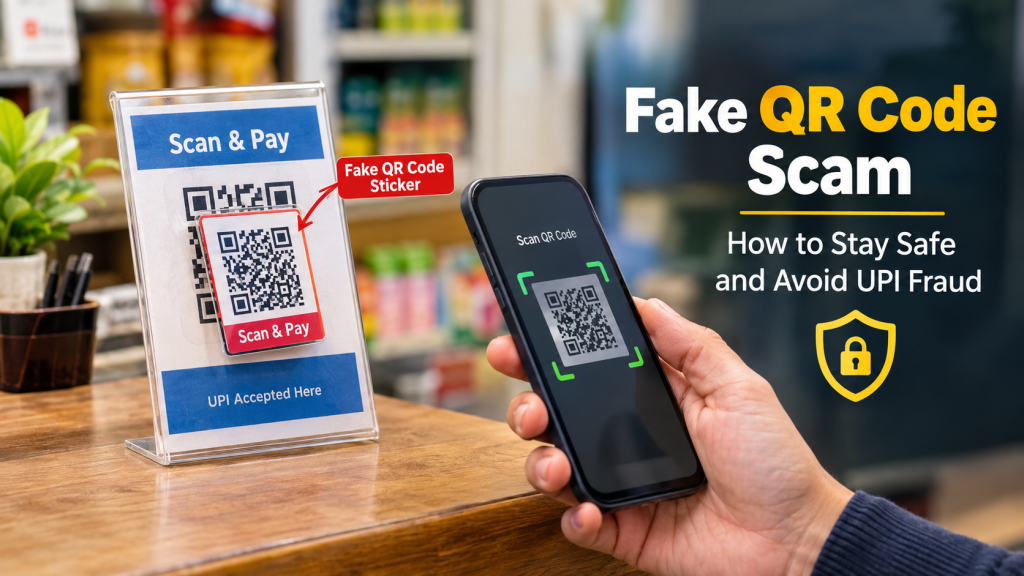
For example, a scammer might place a fake QR code sticker over the original payment QR code at a shop.
Customers may scan it without noticing the difference and accidentally send money to the scammer.
The biggest problem?
A QR code may look completely normal, even when its destination is fraudulent.
2. How Does a Fake QR Code Scam Work?
Let’s understand this with a simple real-world scenario.
Imagine you visit a local grocery store to purchase some items.
At the payment counter, you see a QR code displayed with a message saying “Scan & Pay.”
However, someone has already placed a fake QR code sticker over the original one.
You don’t notice the replacement.
You scan the QR code using your UPI application.
A payment screen appears, and without checking the receiver’s name, you enter your UPI PIN.
The transaction is completed.
Unfortunately, the money goes to the scammer instead of the shopkeeper.
The scammer doesn’t even need to interact with you directly.
Other Ways Scammers Use QR Codes
Scammers may also send QR codes through messages, emails, or social media.
Here are some common tricks:
| Scammer’s Message | Possible Risk |
|---|---|
| Scan this QR code to get cashback | Fake payment or phishing page |
| Scan to receive your refund | Manipulation into authorizing a payment |
| Scan to claim your prize | Personal information theft |
| Scan to complete KYC | Fake website asking for sensitive information |
| Scan this code to receive money | Fraudulent payment request |
Remember, not every QR code is dangerous. The risk depends on where the QR code comes from and what happens after you scan it.
3. The Biggest UPI Misconception: Do You Need a PIN to Receive Money?
This is one of the most important things every UPI user should understand.
Imagine someone tells you:
“I am sending you money. Scan this QR code and enter your UPI PIN to receive the payment.”
STOP!
This is a major warning sign.
Your UPI PIN is used to authorize transactions. It should never be shared with anyone.
According to NPCI, a UPI PIN is required to authorize bank transactions. The PIN should remain confidential.
The Reserve Bank of India also advises users that entering a PIN or OTP is not required to receive money.
Remember: Entering your UPI PIN means you are authorizing a transaction. Always check whether you are sending money or receiving it.
Official Reference:
https://www.npci.org.in/what-we-do/upi/faqs
4. How to Identify a Fake QR Code
Fake QR codes are not always easy to identify. However, certain warning signs can help you stay alert.
1. A Sticker Placed Over Another QR Code
If you notice another sticker placed over a QR code at a shop, parking area, or public location, don’t scan it immediately.
Ask the shopkeeper or service provider to verify the original payment QR code.
2. QR Codes Received from Unknown People
Be careful when someone sends you a QR code through WhatsApp, SMS, email, or social media.
This is especially important when the message promises cashback, refunds, rewards, or special offers.
3. An Unknown Website Opens After Scanning
If scanning a QR code redirects you to an unfamiliar website, stop and verify the source.
Be particularly cautious if the website asks for:
- Bank account details
- Debit or credit card information
- OTP
- UPI PIN
- Account password
- Other sensitive personal information
Never enter confidential information on an unfamiliar website.
4. The Receiver’s Name Looks Different
Before confirming a UPI payment, carefully check the receiver’s name displayed in your payment application.
If the name doesn’t match the intended person or business, do not proceed.
5. Someone Is Pressuring You to Make a Quick Payment
Scammers often create urgency to prevent people from thinking clearly.
You may hear statements like:
- “Scan quickly, the offer is about to expire.”
- “Your refund will be cancelled.”
- “Complete the payment immediately.”
- “You will lose your reward if you delay.”
Whenever someone pressures you to act immediately, take a moment to verify the request.
5. Six Things to Check Before Scanning a QR Code
Before making any digital payment, take a few seconds to verify the following:
- Did the QR code come from a trusted source?
- Is there any suspicious sticker placed over the original QR code?
- Does the correct application or website open after scanning?
- Is the receiver’s name correct?
- Is the payment amount accurate?
- Is anyone asking for unnecessary PIN, OTP, or personal information?
A few seconds of verification can help prevent an unnecessary financial loss.
However, remember that these checks reduce risk but cannot guarantee that every QR code is safe.
6. What Should You Do If You Have Scanned a Fake QR Code?
First, don’t panic.
Simply scanning a QR code does not automatically mean your money has been stolen.
The risk depends on what happened after scanning.
If You Only Scanned the QR Code
If you scanned a suspicious QR code but did not make a payment or share sensitive information:
- Do not authorize any unexpected payment.
- Do not enter personal details on unfamiliar websites.
- Do not download suspicious applications.
- Close the suspicious website.
- Avoid following further instructions from the source.
If You Entered Your UPI PIN or Lost Money
If you accidentally authorized a fraudulent transaction, take immediate action.
- Contact your bank and UPI application’s official support.
- Report the unauthorized transaction immediately.
- Call 1930, India’s Cyber Financial Fraud Helpline.
- Register a complaint on the National Cyber Crime Reporting Portal.
- Keep transaction IDs, screenshots, messages, and other evidence safe.
Important Emergency Contact: 1930
National Cyber Crime Reporting Portal:
https://www.cybercrime.gov.in/
Quick reporting can help authorities and financial institutions take appropriate action.
7. How to Protect Yourself from Fake QR Code Scams
Digital payments are convenient, but basic safety habits are essential.
Follow these precautions:
- Always use trusted payment sources.
- Check for suspicious stickers on QR codes at public places.
- Verify the receiver’s name before confirming payment.
- Avoid opening unfamiliar websites through unknown QR codes.
- Never share your UPI PIN or OTP with anyone.
- Don’t fall for attractive cashback or refund offers without verification.
- Never enter your UPI PIN just because someone claims you need it to receive money.
- Do not approve unexpected payment requests.
- Use your payment application’s official support section when you need assistance.
Most importantly, if something feels unusual, stop the transaction and verify it directly with the concerned business or bank.
8. Frequently Asked Questions (FAQs)
Q1. Can scanning a QR code steal money?
Scanning a QR code alone does not necessarily result in money being stolen. However, if you authorize a fraudulent payment or share sensitive information after scanning, you may suffer financial loss.
Q2. Is it easy to identify a fake QR code?
Not always. A fake QR code can look almost identical to a genuine one. Therefore, checking its source, destination, and payment details is important.
Q3. Do I need to scan a QR code to receive money?
You can share your own UPI QR code with someone who wants to pay you. However, you do not need to scan a QR code sent by someone else and enter your UPI PIN to receive money.
Q4. Can a QR code displayed at a shop also be fake?
Yes. A scammer may replace a genuine QR code with a fraudulent one. Always verify the receiver’s name before completing a payment.
Q5. Where can I report a Fake QR Code Scam in India?
If you experience financial cyber fraud, immediately call 1930 and report the incident through the National Cyber Crime Reporting Portal:
https://www.cybercrime.gov.in/
Final Reminder from Click Smartly
QR codes make digital payments easier, but convenience should never replace caution.
A small mistake while scanning or approving a payment can create unnecessary problems.
Before scanning, check the source.
Before paying, verify the receiver.
And never enter your UPI PIN just because someone asks you to receive money.
Think Before You Scan. Verify Before You Pay.
About Click Smartly
Click Smartly aims to promote cybersecurity awareness and safer digital behaviour.
Our mission is to help people understand online scams, identify suspicious activities, and make safer decisions in the digital world.
Follow Click Smartly for practical cybersecurity awareness and digital safety tips.
Official References
- Reserve Bank of India – QR Code Safety:
https://rbikehtahai.rbi.org.in/qr - National Payments Corporation of India – UPI FAQs:
https://www.npci.org.in/what-we-do/upi/faqs - NPCI – Fraud Awareness:
https://www.npci.org.in/fraud-awareness - Government of India – National Cyber Crime Reporting Portal:
https://www.cybercrime.gov.in/
Disclaimer: This article is intended for cybersecurity awareness and general information. It does not constitute financial or legal advice.